It's 1:40 AM. You've rolled the same portrait forty times, and every face that comes back is lovely and dead. The cheeks have the sheen of a candle. The eyes are glassy and symmetrical. The skin looks like it was sanded by a committee. You squint at the screen and think: I know what a real person looks like. Why can't I get one?
You're not bad at prompting. You're fighting a statistical gravity well.
These models trained on millions of images, and a staggering share of the "beautiful portrait" images online are retouched, filtered, frequency-separated, and airbrushed within an inch of their lives. When you type "beautiful woman, ultra realistic, 8k, perfect skin," the model delivers the average of every glossy beauty ad it has ever seen. That average has no pores.
This guide is about breaking out of it. You'll get the reasoning, the formulas, and the copy-paste prompts for both Midjourney v6.1 and FLUX.1 Dev, so your next portrait has the texture of an actual human being.
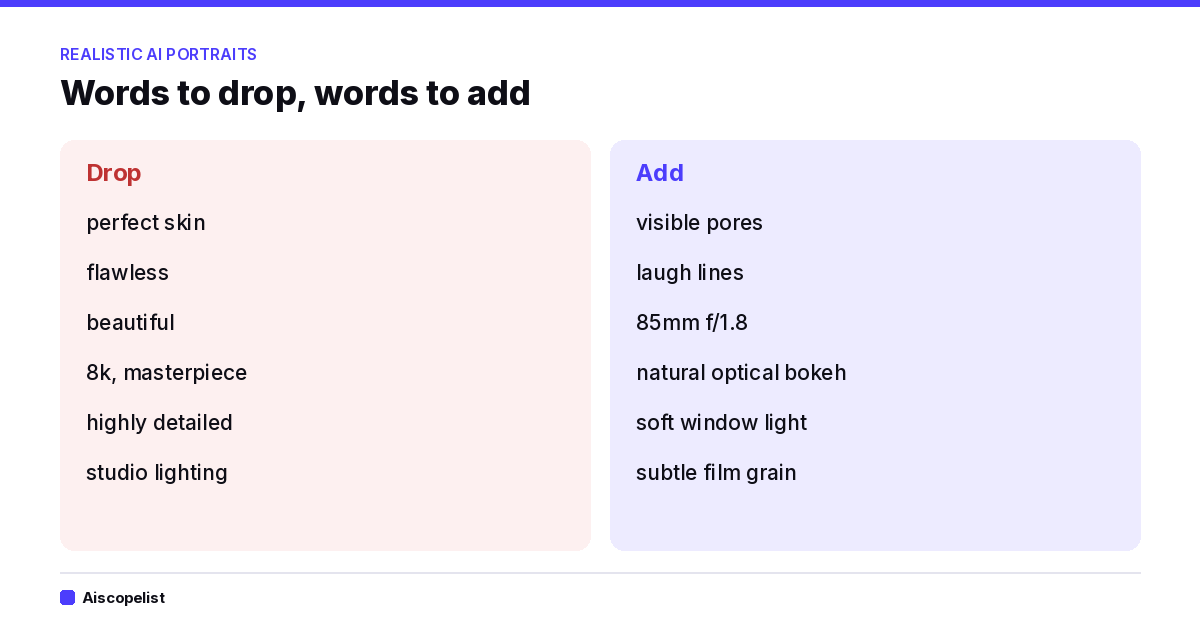
"Perfect" and "flawless" are direct requests for retouched skin. You asked for the wax, and the model obliged.
"8k," "masterpiece," "highly detailed" are quality-spam tokens. They push toward a hyper-rendered, illustrated look rather than a photographic one. Real photographs don't look "detailed" in that crunchy, over-sharpened way.
"Studio lighting" often brings flat, frontal, shadowless light, which erases the micro-contrast your eye uses to read skin as skin.
"Beautiful" drags the whole image toward the symmetrical, beauty-filter median.
Words that cause the wax look, and what to use instead
The fix isn't adding more adjectives. It's changing what kind of photograph you're asking for. You want to describe a moment, a lens, a light, and a person with specific flaws, and then let the model infer realism from the context rather than commanding it.
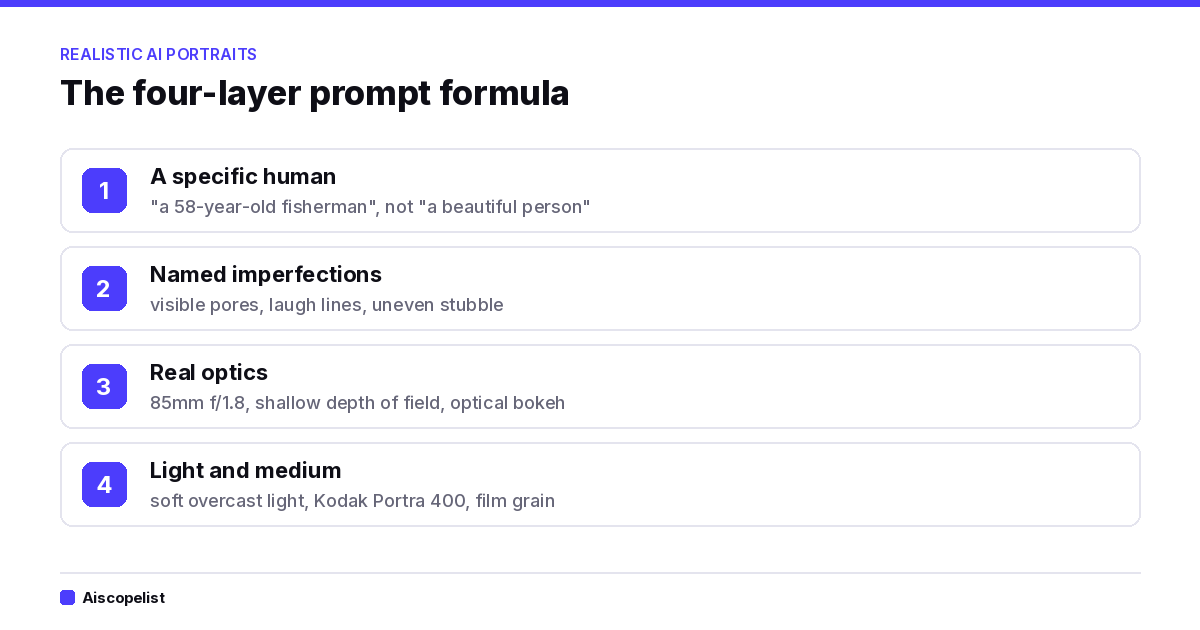
The Four-Layer Formula for a Realistic AI Portrait Prompt
Every portrait prompt that holds up stacks four layers. Skip one and the plastic creeps back.
The four-layer formula at a glance
1. A specific human, not a "beautiful person."
Age, a job, a detail that implies a life. "A 58-year-old fisherman" gives the model permission to draw weathered skin. "A woman" gives it permission to draw a catalog.
2. Named imperfections.
This is the layer almost everyone skips. Ask for the things retouchers remove: visible pores across the nose, uneven stubble, laugh lines, a slight sunburn on the cheekbones, faint under-eye shadows, a few stray flyaway hairs. The model has seen these in unretouched photography. You just have to point at them.
3. Real optics.
Replace "high quality" with the physics of a lens. Say 85mm f/1.8, shallow depth of field, natural optical bokeh. Lens language pulls the model toward photographic references instead of digital art. It also gives you that creamy, imperfect background falloff, with light-blobs that have slightly different edges, rather than a Gaussian blur pasted behind a cutout.
4. Believable light and a medium.
Overcast window light, golden hour from the left, a flash-on-camera look. Then anchor the medium: Kodak Portra 400, subtle film grain. Grain breaks up the smoothness your eye reads as fake.
Midjourney: The Skin Texture Prompt
Here's the prompt, ready to paste. It pins version 6.1 with --v 6.1; delete that flag to use the current default model. Midjourney plans start at $10 a month, or $8 a month on yearly billing, according to its plan comparison page.
candid portrait of a 58-year-old fisherman on a wooden dock at dusk, deep laugh lines, uneven grey stubble, visible pores across the nose, slight sunburn on the cheekbones, wind-tousled hair, shot on 85mm f/1.8, shallow depth of field with natural optical bokeh, soft overcast light, subtle film grain, Kodak Portra 400 --style raw --s 100 --ar 4:5 --v 6.1
Two parameters matter here more than any adjective.
--style raw dials down Midjourney's built-in aesthetic polish. Without it, the model quietly beautifies everything you give it, which is exactly the wax problem. If you've never turned it on for portraits, this single flag may fix half your frustration.
--s 100 (stylize) keeps the model from over-interpreting. High stylize values chase "pretty." Lower values listen to you. Start around 50 to 150 and see how much texture survives.
If the face still looks airbrushed, add the thing you don't want as plain exclusion: --no smooth skin, airbrushed, retouched. It's a blunt tool, but it works in small doses. Don't stack ten exclusions or the image goes strange.
FLUX.1 Dev: Write Sentences, Not Tag Soup
FLUX behaves differently, and this is where people port their Midjourney habits and get burned. Flux responds to natural-language description far better than comma-separated keyword piles. It also doesn't use a negative prompt in the standard Dev workflow, so you can't tell it what to avoid. You have to describe what you want so completely there's no room left for plastic.
A candid photograph of a 58-year-old fisherman standing on a wooden dock at dusk. His skin is weathered and uneven, with deep laugh lines, visible pores across his nose, and a faint sunburn on his cheekbones. Grey stubble covers his jaw in patches. Soft overcast light falls from the left. The photo was taken on an 85mm lens at f/1.8, so the background dissolves into soft, slightly imperfect bokeh. Fine film grain, muted Kodak Portra colors.
One more lever lives outside the prompt. In most FLUX.1 Dev setups, the guidance scale setting controls how hard the model pushes toward your prompt. Many users find that the default range can produce an oversaturated, glossy look, and that nudging guidance down (somewhere in the 2.0 to 3.5 range, depending on your interface) lets skin breathe. Try it on a fixed seed so you can see the difference with your own eyes rather than trusting anyone's numbers. Your tooling may behave differently.
What This Approach Does Well, and Where It Fails
Honest accounting, because no formula is magic.
What works
Named imperfections give you pores and asymmetry on the first or second roll rather than the fortieth.
Lens language reliably improves background rendering and depth.
The approach is portable. The same four layers work across Midjourney, Flux, and most other photoreal models.
What doesn't
You can overshoot. Ask for "visible pores, deep wrinkles, sunburn, stubble" in one prompt and you may get a face that looks like a weathering texture pack. Pick two or three imperfections, not eight.
Hands and eyes remain a separate fight. This formula fixes skin. It doesn't fix a sixth finger.
Younger subjects are harder. Models associate youth with smoothness so strongly that asking for realistic skin on a 22-year-old takes more coaxing. Try specifics like "a few freckles, slight redness around the nose, a small blemish on the chin."
Results shift between model versions. What works on v6.1 may behave differently after an update. Treat any formula as a starting point and check it again after each update.
A Workflow Worth Stealing
Write the four layers as plain sentences first.
Generate four images with one fixed seed.
Change one thing per round: the imperfection list, then the lens, then the light.
Keep a note of what each change did. In an hour you'll know your model's personality better than any tutorial can teach.
If you'd rather skip the notebook, save the formula as a template and swap variables in and out without retyping. Our prompt library has more starting points. And if Midjourney and Flux aren't giving you what you need, compare them with Leonardo.Ai, Ideogram and Krea AI, or browse the AI image generation category, before committing another month of subscription. Our guide to what AI tools cost per month shows where image tools sit on price.
Make People, Not Mannequins
Somewhere in your folder is a face that almost worked: the right jaw, the right light, a gaze that nearly landed. Open that prompt again. Delete "perfect." Add the sunburn, the pores, the lens. Give the person a job and a Tuesday.
Photography has always been about the thing the camera noticed that you didn't expect. These models can notice too, but only if you tell them a real person is in the room.
So go roll the dice. Make something with pores in it.
Frequently Asked Questions
Key questions and answers regarding Why Your AI Portraits Look Like Wax Figures.
Midjourney is an AI image and video generator from a small independent research lab, known for its polished, artistic look. It runs on the web and Discord, with plans from $10 a month or $8 billed yearly.
Leonardo.Ai is a generative platform for images, video, design and motion with access to 80+ models, on web and mobile. It suits artists, marketers and game teams, with a free daily token plan and paid plans from $12.
Free plan·from $12/monthNo reviews yet
IdeogramImage Generationfrom $15
Ideogram is an AI image and media platform known for clean text in images, with Ideogram 4.5 models, editable text layers and an API. It suits designers, marketers and developers, with pay as you go credits and plans from $15 a month.
from $15No reviews yet
Krea AIImage GenerationFree plan·from $5.25
Krea AI is a creative suite that brings image, video and upscaling models into one workspace, plus an agent that plans and builds whole sets of visuals. It has a free plan with daily units and paid plans available.
Free plan·from $5.25No reviews yet
ChatGPTChatbotsFree plan·from $8
ChatGPT is OpenAI's AI assistant for writing, research, coding, data analysis and image generation. It suits students, professionals and teams, with a free plan and paid plans offering more models.

 aiscopelist