Most AI tools cost between $8 and $20 a month for the first paid plan. Across the 53 tools in our AI Tool Price Index that offer a month-to-month price, the median is $15 a month. And you may not need to pay at all: 65 of the 79 tools we list (82%) have a free plan.
This guide breaks those numbers down by category, shows what a realistic monthly AI budget looks like for different kinds of users, and points out the costs that do not appear on the pricing page headline. All figures come from the plan details on our tool pages, which record each official pricing page.
The key numbers
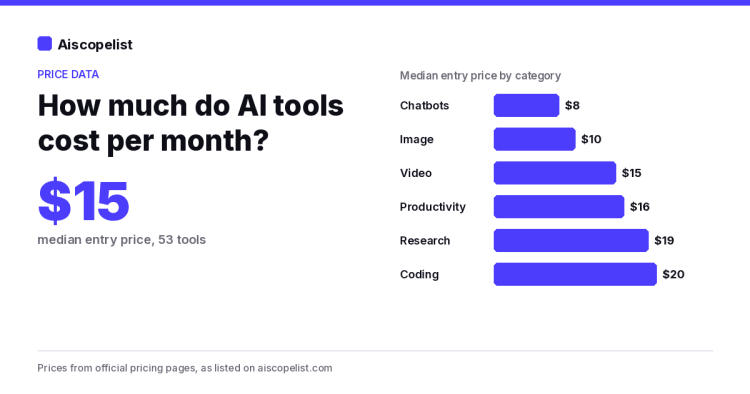
$15 a month is the median cheapest paid plan you can pay month to month. Sample: 53 tools.
$4.99 to $69 is the range of those entry prices, from Character.AI and Gemini Notebook AI at the low end to Jasper at the top.
82% (65 of 79) of tools have a free plan.
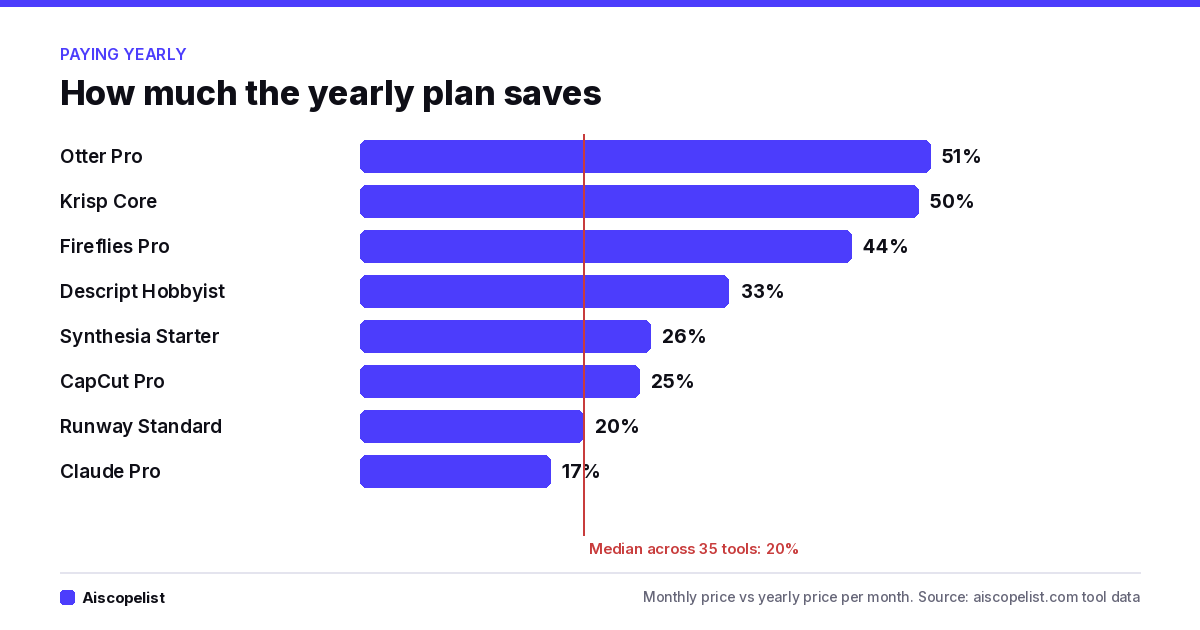
20% is the median saving for paying yearly, across 35 tools that list both a monthly and a yearly price for the same plan.
54% (43 of 79) put at least one plan behind "contact sales".
12 of 79 mention a free trial. For most AI tools, the free plan has replaced the trial.
AI tool prices by category
The category you shop in matters more than the brand. Here is the median entry price for each category in the index, based on each tool's cheapest monthly plan.
Category
Median entry price
Tools counted
Examples on our list
Chatbots
$8/month
9
ChatGPT Go $8, Grok $8, Google AI Plus $4.99
Image generation
$10/month
4
Midjourney Basic $10, Adobe Firefly $9.99
Video
$15/month
9
Runway Standard $15, HeyGen Creator $29
Productivity
$16/month
9
Otter Pro $16.99, Granola Business $14
Research
$19/month
3
Elicit Plus $19, Consensus Pro $20
Coding
$20/month
9
Replit Core $20, GitHub Copilot Pro $10
Coding tools cost about 2.5 times what chatbots cost to start. That makes sense: coding assistants run longer jobs and use more computing power per request, and their plans are often built around monthly usage credits.
What a monthly AI budget looks like
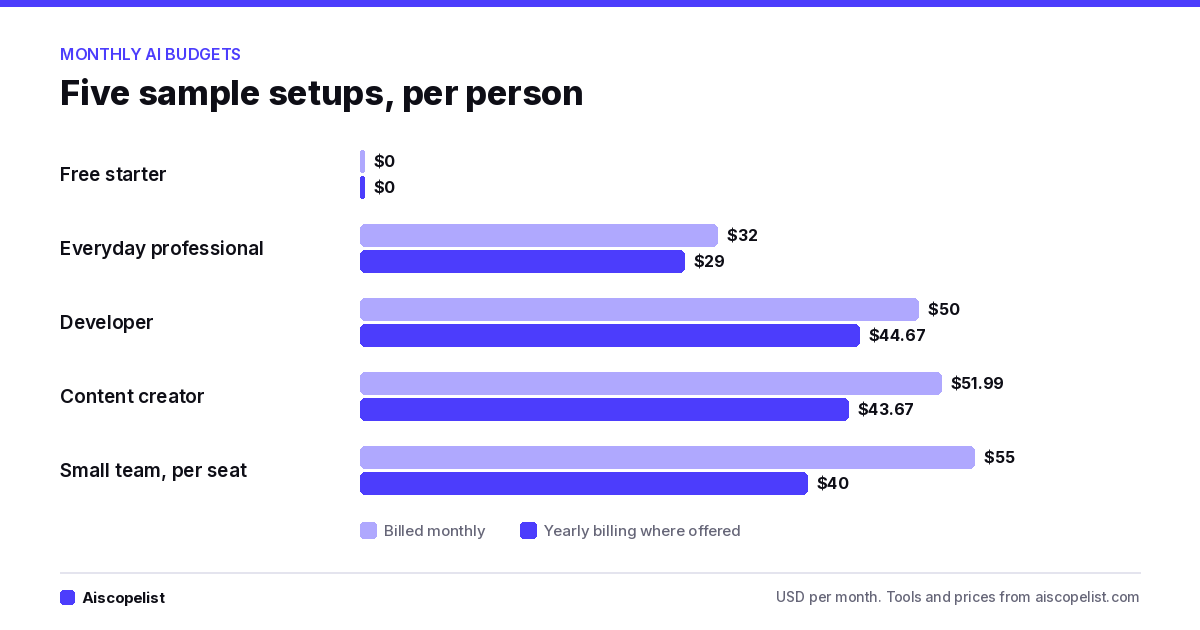
Few people use just one AI tool. Here are four sample setups built only from tools and prices on our list. They are examples, not recommendations, but they show how fast small subscriptions add up.
Chart: sample monthly budgets built from tools and prices on Aiscopelist
The free starter: $0
ChatGPT Free for everyday questions, Gemini Notebook AI for studying your own documents, and Grammarly Free for writing checks. All three have free plans. For many students and casual users, this covers almost everything.
The everyday professional: about $30
One main assistant, such as Claude Pro at $20 (or $17 a month yearly), plus Canva Pro, which is sold yearly at $144 ($12 a month). Total: $29 to $32 a month, depending on billing.
The content creator: about $45 to $55
Tool
Monthly billing
Yearly billing (per month)
Claude Pro
$20
$16.67
Canva Pro
Yearly only
$12
CapCut Pro
$19.99
$15
Total
$51.99 (Canva at its yearly rate)
$43.67
The developer: about $50
GitHub Copilot Pro at $10, Claude Pro at $20 and Replit Core at $20 comes to $50 a month. Paying yearly where it is offered (Claude and Replit) brings it to about $45.
The small team: about $40 to $55 per person
Notion Plus ($12 per seat, or $10 yearly), Fireflies.ai Pro for meeting notes ($18 per seat, or $10 yearly) and Claude Team ($25 per seat, or $20 yearly). That is $55 per person on monthly billing and $40 on yearly billing. For a five-person team, the yearly choice saves $900 a year.
The costs that are not on the price tag
Usage credits
Many AI tools now sell credits instead of unlimited use. Video tools count credits per clip, coding tools include a monthly credit allowance, and assistants describe plans as multiples of free usage. The sticker price tells you what you pay; the credits tell you what you get. Compare those two before you compare tools.
Per-seat pricing
Team plans usually charge per person. A $10 tool becomes $100 a month for a team of ten. Prices listed "per seat" or "per user" on our tool pages are marked that way for this reason.
Yearly-only plans
Nine tools in the index sell their paid plans yearly only, including Canva, Gamma, VEED and Murf. The monthly figure you see is a yearly bill divided by 12, so you commit to the whole year upfront.
"Contact sales" tiers
More than half the tools hide at least one plan behind a sales call, usually the team or enterprise level. Two tools on our list, Gong and Harvey AI, show no public price at all. If you are buying for a company, budget time for a quote as well as money.
Currency and tax
Prices here are US dollars before tax. Some tools charge in other currencies. AIVA, for example, prices in euros plus VAT. Your card may also add a foreign transaction fee, which is worth knowing if you pay from outside the US.
When a free plan stops being enough
Free plans are generous, but they are built to show you the product, not to carry daily work. These are the usual signs it is time to pay:
You hit the limit before lunch. Rolling limits, like Claude's 5 hour window or ChatGPT's slower speed at busy times, start to cost you real time.
You need history. Some free plans cap what you keep. Granola's free plan, for example, keeps 30 days of meeting history.
You need clean output. Free video plans from tools like HeyGen and Synthesia add a watermark.
You work with others. Shared workspaces, admin controls and team billing almost always sit on paid plans.
If none of these apply, keep the free plan. Paying for a tool you open twice a month is the most common way people overspend on AI.
Seven ways to pay less for AI
Chart: yearly billing savings by tool, from Aiscopelist tool data
Use the free plan first. With 82% of tools offering one, there is rarely a reason to pay on day one.
Pay yearly only for tools you use every week. The median saving is 20%, and some tools give much more. Otter Pro is $16.99 monthly or $8.33 a month yearly, about half.
Do not double up. If you pay for Microsoft 365 or Google storage, check whether Copilot or Gemini is already included before buying another assistant.
Look for student or education plans.Mistral lists an Education plan at $5.99 a month for students.
Audit every three months. List every AI charge on your card and cancel what you have not opened in 30 days.
Buy budget tiers on purpose. ChatGPT Go ($8) and Google AI Plus ($4.99) exist for people who need more than free but not the $20 tier.
Check the official page before paying. AI pricing changes often. Our listings link to each official pricing page, such as Canva's and Notion's, so you can confirm the current price.
How we put these numbers together
The numbers come from the plan data on our 79 published tool pages. For the median, we counted only tools with a flat US dollar price you can pay month to month (53 tools). Tools priced by usage, in another currency, or only through sales were left out of that figure and are listed on the price index page with the reason.
ChatGPT is OpenAI's AI assistant for writing, research, coding, data analysis and image generation. It suits students, professionals and teams, with a free plan and paid plans offering more models.
Free plan·from $8No reviews yet
ClaudeChatbotsFree plan·from $17
Claude is Anthropic's AI assistant for writing, research, data work and coding, with a context window of up to 1 million tokens. It suits professionals and developers, and it has a free plan with paid plans available.
Free plan·from $17No reviews yet
CanvaDesignFree plan·from $10
Canva is an online design tool with millions of templates, stock media and AI features like background removal and design generation. It suits non-designers, marketers and teams, and the free plan covers most basic work.
Free plan·from $10No reviews yet
NotionProductivityFree plan·from $10
Notion is an all-in-one workspace for notes, docs, wikis and project tracking, with built-in AI that answers with citations and agents that handle repetitive tasks. It has a free plan and Plus from $10 per seat.
Free plan·from $10No reviews yet
GitHub CopilotCodingFree plan·from $10
GitHub Copilot is an AI coding assistant that suggests code in your editor, answers questions in chat and runs coding agents on GitHub. It suits developers and teams, with a free plan and Pro at $10 per user a month.
Free plan·from $10No reviews yet
ReplitCodingFree plan·from $18
Replit is a browser-based platform where Replit Agent turns your ideas into working apps and websites, then hosts them. It has a free Starter plan, with Core and Pro paid plans available.
Gemini Notebook, formerly NotebookLM, is Google's AI research tool that answers questions using only the sources you upload. It suits students, researchers and teams, is free to start, and gets higher limits with Google AI plans.
Free plan·from $4.99No reviews yet
JasperMarketingfrom $59
Jasper is an AI content platform for marketing teams that learns your brand voice, style guide and product facts. It helps create campaigns, blogs, emails and social posts, with Pro at $59 a month billed yearly.
from $59No reviews yet
Fireflies.aiProductivityFree plan·from $10
Fireflies.ai is an AI meeting assistant that joins Zoom, Google Meet and Teams calls to record, transcribe and summarize them. It suits sales, recruiting and remote teams, with a free plan and paid plans available.
Free plan·from $10No reviews yet
Mistral Vibe AICodingFree plan·from $5.99
Mistral Vibe is the AI assistant and coding agent from French company Mistral AI, available on web, mobile, a CLI and IDE plugins. It handles chat, search, coding, slides and images, with a free plan and Pro at $14.99 a month, from $5.99 for students.

 aiscopelist