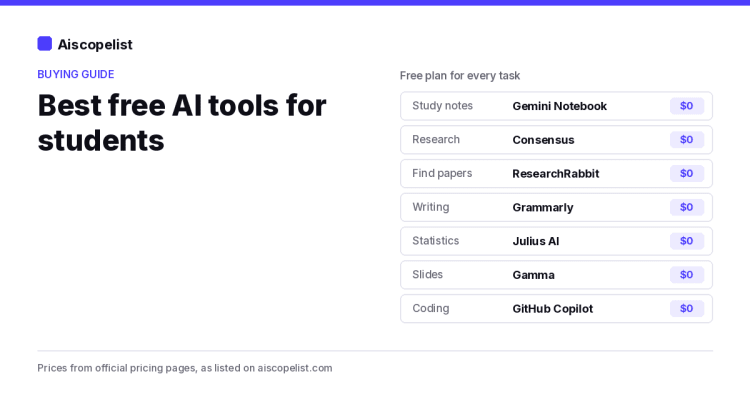
You can cover almost every part of student life with AI tools that cost nothing. Our short list: Gemini Notebook AI for studying your own notes and readings, Consensus and ResearchRabbit for finding papers, Grammarly for cleaning up writing, Julius AI for data and statistics homework, Gamma for slides, and GitHub Copilot if you code. Each one has a free plan, and the limits are listed below so you know what you are getting.
We picked these 12 tools from the 79 on Aiscopelist by looking at what students actually need to do, then checking each tool's official pricing page for what the free plan includes. We describe plans and features as the companies list them; we do not grade output.
Gemini Notebook: turn your readings into a study partner
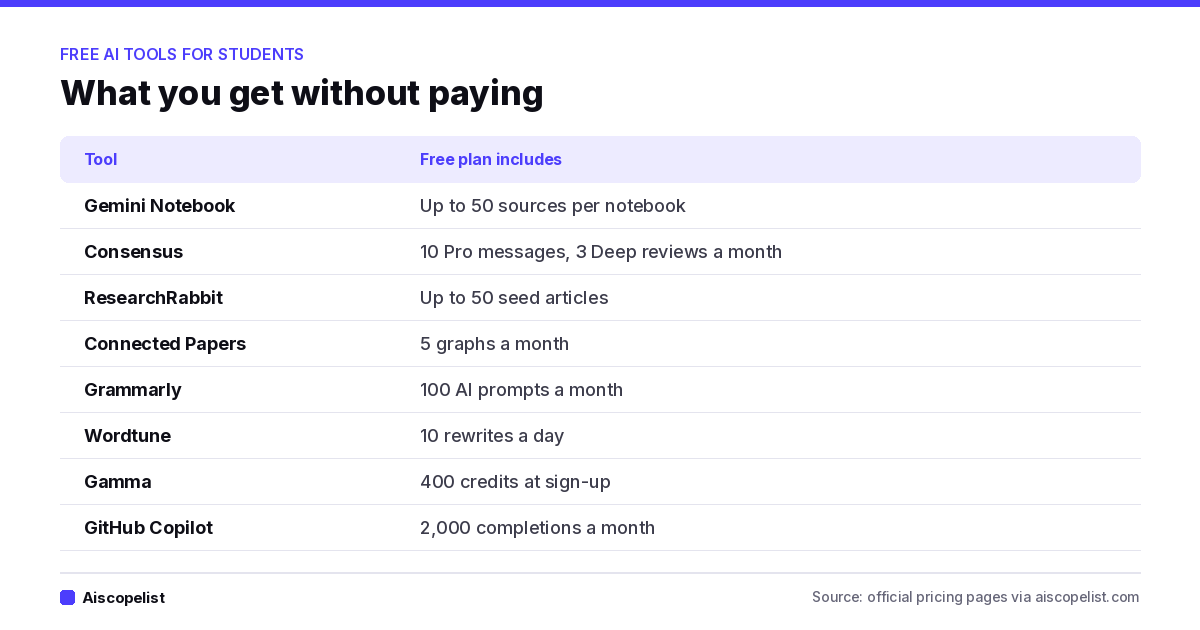
Upload lecture slides, PDFs and notes, and Gemini Notebook answers questions using only those sources. The free version allows up to 50 sources in each notebook, which is enough for most courses. It is the best fit for exam review, because answers stay tied to your actual class material instead of the whole internet. Higher limits come with Google AI plans, starting at $4.99 a month for 100 sources per notebook, according to Google's plans page.
Consensus and Elicit: answers from published research
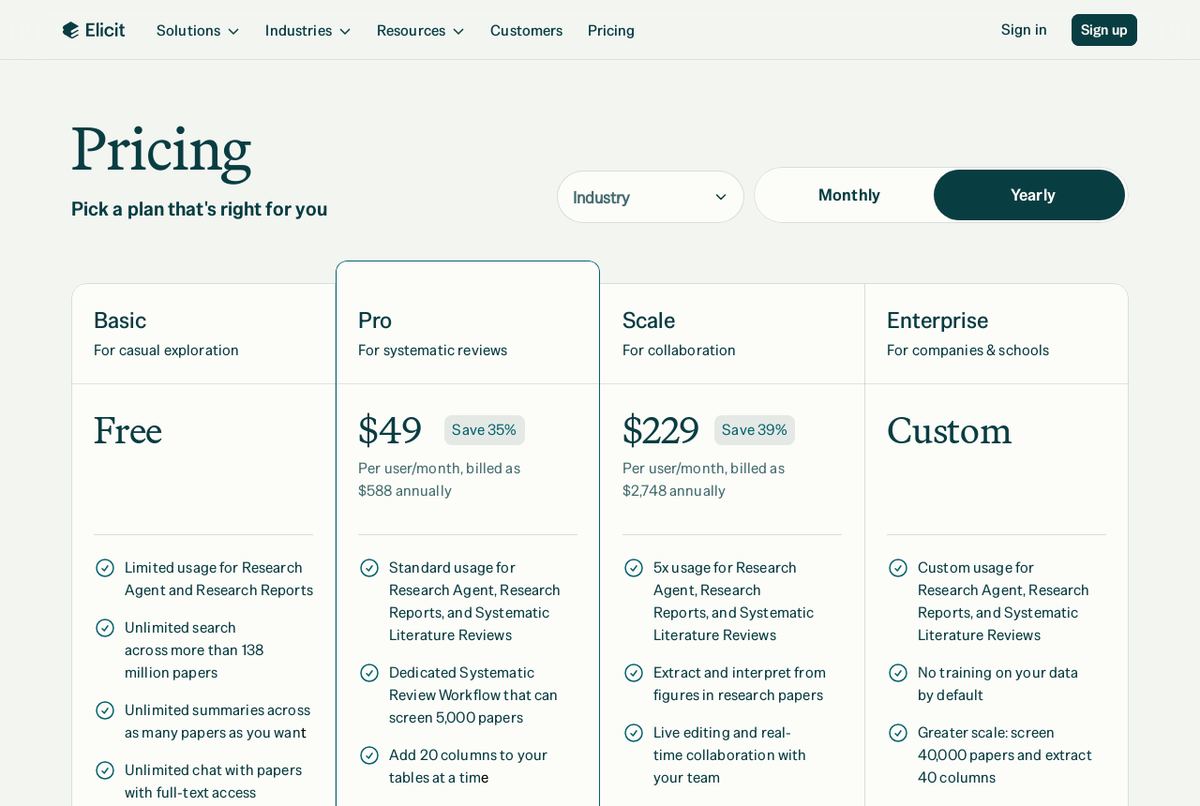
Both tools search academic papers instead of the open web. Consensus is quicker for a yes-or-no style question ("does sleep affect memory?"), and its free plan includes 10 Pro messages and up to 3 Deep reviews a month. Elicit is built for pulling details out of many papers at once, and its free Basic plan includes a limited Research Agent and Reports. Elicit's academic pricing is lower than its industry pricing: Plus is $19 a month or $11 a month yearly. You can compare tiers on Elicit's pricing page.
ResearchRabbit and Connected Papers: find what you missed
When you have one good paper and need ten more, these two tools help. ResearchRabbit builds a map from up to 50 seed articles on its free plan. Connected Papers draws a graph of prior and derivative work, with 5 graphs a month free and all features included. Use them early in a literature review to see which papers everyone else cites.
Perplexity: fast answers with links
For quick questions where you want to see the sources, Perplexity's free plan works well, with a limit on advanced searches. Always open the links and read the original before you cite anything.
For writing
Grammarly
The free plan catches spelling and grammar issues and includes 100 AI prompts a month for rewrites and suggestions. That is plenty for polishing essays.
Wordtune
Wordtune does one job well: it suggests different ways to say a sentence. The free Basic plan gives you 10 rewrites a day and 3 summaries a month. If you upgrade, Advanced costs $4.89 a month on yearly billing, one of the cheapest paid plans on our list.
ChatGPT, Claude or Gemini for explanations
A general assistant is the most flexible tool here. Use it to explain a hard concept three different ways, quiz you before an exam, or give feedback on your outline. ChatGPT, Claude and Gemini all have free plans. If you want to compare their paid tiers, our ChatGPT vs Claude vs Gemini pricing guide lays them out.
For math, data and coding
Julius AI
Julius lets you upload a spreadsheet and ask questions in plain English, then shows the analysis and charts. For statistics classes and lab reports, that saves hours of formula hunting. The free plan comes with a daily credit allowance.
GitHub Copilot
Copilot's free plan includes 2,000 code completions a month with entry-level models. That covers most class projects. If you study computer science, check GitHub's student program too, since it changes from time to time.
For presentations and design
Gamma turns an outline into a slide deck. The free plan gives you 400 credits when you sign up, with no refill, so save them for real assignments. Canva is the other student favorite: its free plan includes more than 1.6 million templates and 5 GB of storage, with limited AI features. For both, the free version is enough for a class presentation.
A simple weekly routine with these free tools
Chart: what you get without paying, from official pricing pages
Tools only help if they fit into how you already study. Here is one way to use the free plans together across a normal week, without paying for anything.
After each lecture (10 minutes): add the slides and your notes to a Gemini Notebook for that course. Ask it for the three ideas you are most likely to see on the exam, then check them against your notes.
When an assignment opens: ask Consensus a focused question to see what the research says, then drop the best paper into ResearchRabbit to find related work. Save Elicit for the week you write a literature review, since its free plan is limited.
While drafting: write the first version yourself. Use ChatGPT or Claude to question your argument ("what would a critic say about paragraph two?"), not to write it.
Before you submit: run the final text through Grammarly's free checks, and use Wordtune's daily rewrites on the two or three sentences that still feel clumsy.
Before exams: ask your notebook to quiz you with ten questions, answer them without looking, and review only what you missed.
This routine uses daily and monthly free allowances in a way that rarely hits the limits, because each tool does one small job.
Using AI in school without getting in trouble
Read your course policy first. Rules differ by school, by class and even by assignment. When in doubt, ask your instructor.
Use AI to learn, not to submit. Explanations, quizzes and feedback help you understand. Handing in AI-written work as your own can break academic rules.
Check every fact and citation. AI tools can get details wrong. Research tools like Consensus and Elicit point to real papers, but read the paper before you cite it.
Protect your data. Avoid pasting personal information or unpublished research into tools without reading their privacy policy.
Should students ever pay for AI?
Most students should not, at least not at first. One offer worth checking: at the time of writing, the Google AI plans page says students get Google AI Pro free for one year, which includes higher Gemini limits. Across the 79 tools on our list, 65 have a free plan, and the tools above cover the core of studying. If you do pay, look for student pricing: Mistral lists an Education plan for students at $5.99 a month, and several research tools price academic plans below their business plans. Our AI Tool Price Index shows that the median paid AI plan costs $15 a month, so a student discount can make a real difference.
Gemini Notebook, formerly NotebookLM, is Google's AI research tool that answers questions using only the sources you upload. It suits students, researchers and teams, is free to start, and gets higher limits with Google AI plans.
Free plan·from $4.99No reviews yet
ConsensusResearchFree plan·from $12
Consensus is an AI research search engine that answers questions using peer-reviewed papers and cites every claim. It suits students, academics and clinicians, with a free plan and Pro from $12 a month billed yearly.
Free plan·from $12No reviews yet
ElicitResearchFree plan·from $11
Elicit is a research assistant that searches over 138 million papers, sums up findings, and pulls data into tables. It suits students and research teams who need to get through many studies fast.
Free plan·from $11No reviews yet
ResearchRabbitResearchFree plan·from $10
ResearchRabbit is an AI research discovery tool that turns a few seed papers into a visual map of related work, authors and topics.
Free plan·from $10No reviews yet
Connected PapersResearchFree plan·from $6
Connected Papers builds a visual graph of papers related to one you choose, using the Semantic Scholar database. It suits students and researchers starting a literature review, and the free plan gives 5 graphs a month.
Free plan·from $6No reviews yet
GrammarlyWritingFree plan·from $12
Grammarly is an AI writing assistant that checks grammar and spelling, adjusts tone, rewrites sentences and generates text across apps. It suits students, professionals and teams, with a free plan and paid plans available.
Free plan·from $12No reviews yet
Julius AIData AnalysisFree plan·from $16
Julius AI lets you chat with spreadsheets and databases to analyze data, build charts and write reports. It also makes slides, websites, images and videos, with a free plan and paid plans from $16 a month.
Free plan·from $16No reviews yet
GammaDesignFree plan·from $9
Gamma is an AI tool that creates presentations, documents, simple websites and social posts from a prompt or your notes. It suits founders, marketers, teachers and consultants, with a free plan and paid plans from $9 a month billed yearly.
Free plan·from $9No reviews yet
GitHub CopilotCodingFree plan·from $10
GitHub Copilot is an AI coding assistant that suggests code in your editor, answers questions in chat and runs coding agents on GitHub. It suits developers and teams, with a free plan and Pro at $10 per user a month.
Free plan·from $10No reviews yet
ChatGPTChatbotsFree plan·from $8
ChatGPT is OpenAI's AI assistant for writing, research, coding, data analysis and image generation. It suits students, professionals and teams, with a free plan and paid plans offering more models.

 aiscopelist