If you want one quick answer: Fireflies.ai has the most generous free plan for teams that are fine with a bot joining the call, Granola AI is the pick if you do not want any bot in the meeting, and Otter.ai is the cheapest paid plan on yearly billing at $8.33 a month. Krisp makes sense if noisy calls are your bigger problem.
The right choice depends less on features, which are now similar, and more on how each tool records your meetings. That is where we will start. All plan details and prices come from each tool's official pricing page, as recorded on its listing here.
Two ways AI note takers record your meetings
The bot that joins the call
Otter and Fireflies join your Zoom, Google Meet or Microsoft Teams call as a participant. Everyone sees the note taker in the attendee list. The upside is that it works even when you are not at your computer, and it captures everyone on the call the same way. The downside is social: some clients and interviewees do not like a bot in the room, and some companies block them.
The app on your device
Granola captures meeting audio from your own device, so no bot joins the call. It works with any meeting app, because it listens at the computer level rather than through a meeting integration. Screenpipe takes this further: it records your screen, audio and meetings and keeps that history on your device. Krisp sits in this group too, since it runs on your machine and works in any meeting app.
Whichever type you choose, the rules about recording are the same: tell people you are recording, and follow your local laws and your company's policies. That is true for every tool in this guide.
Prices and free plans side by side
Tool
How it records
Free plan
First paid plan (monthly)
Same plan, billed yearly
Otter.ai
Bot joins Zoom, Teams, Meet
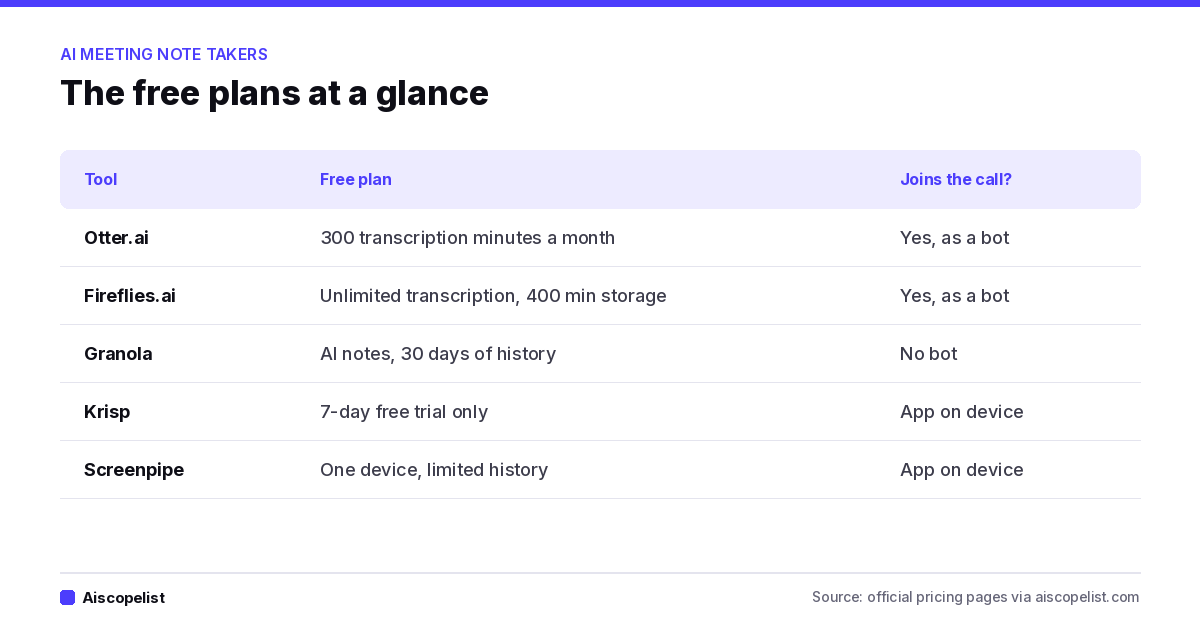
300 transcription minutes a month
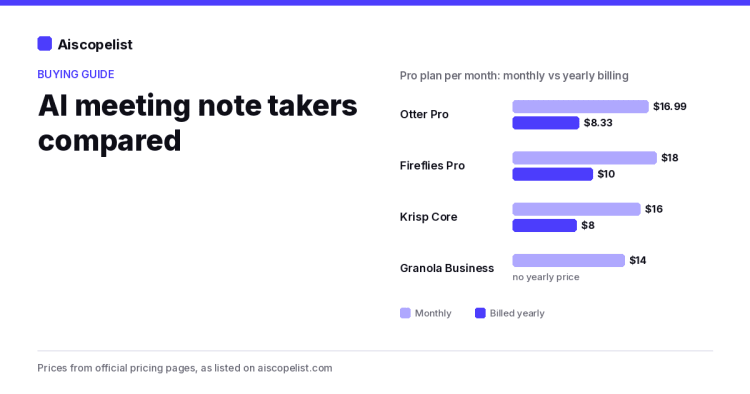
Pro, $16.99
$8.33/month ($99.96/year)
Fireflies.ai
Bot joins Zoom, Meet, Teams and more
Unlimited transcription, 400 minutes of storage, limited AI summaries
Pro, $18 per seat
$10/seat/month ($120/year)
Granola AI
Device audio, no bot
Basic, with 30 days of meeting history
Business, $14 per user
No yearly price listed
Krisp
App on your device
7-day free trial only
Core, $16 per user
$8/user/month ($96/year)
Screenpipe
Records screen and audio on your device
One device, limited history
Basic, $21
$20.83/month ($250/year)
The yearly discounts in this category are unusually large. Otter's Pro plan is 51% cheaper on yearly billing, Krisp's Core plan is 50% cheaper, and Fireflies Pro is 44% cheaper. The median yearly saving across the 35 tools in our AI Tool Price Index that list both prices is 20%, so meeting tools reward commitment more than most.
Otter.ai
Best for: individuals who want a low yearly price and live transcripts.
Otter joins your calls on Zoom, Teams and Google Meet and transcribes live, with speaker labels so you can jump to who said what. Its AI chat can answer questions about one meeting or across many past ones.
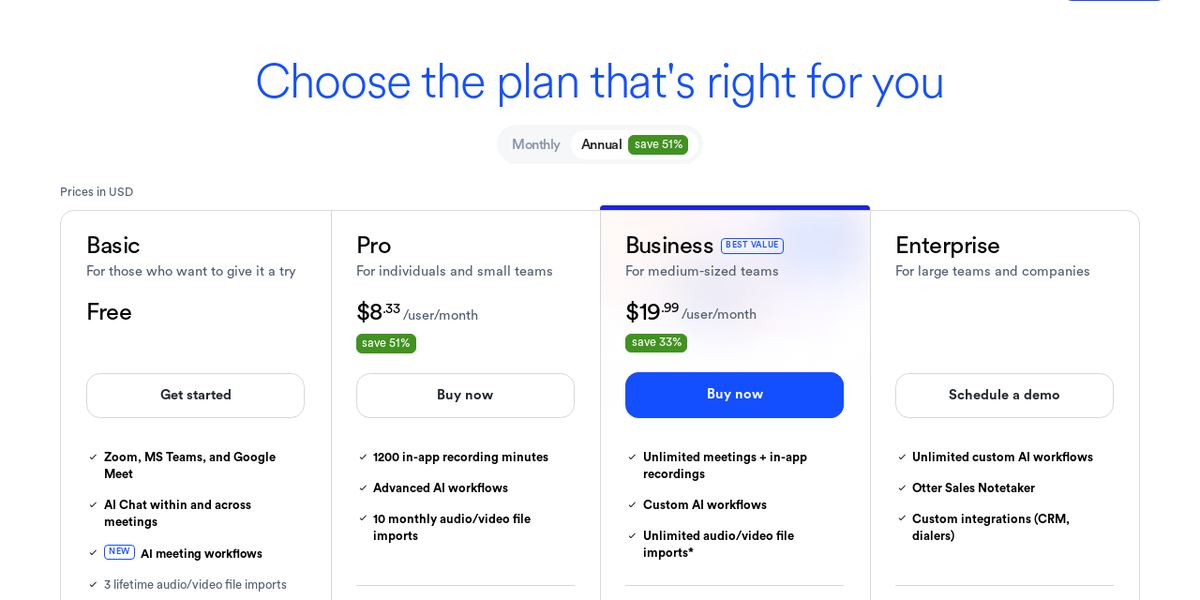
The free plan includes 300 transcription minutes a month and 3 lifetime file imports. Pro raises that to 1,200 minutes a month, with up to 90 minutes per meeting, and adds integrations with Salesforce, HubSpot and Zapier. Business is $30 per user monthly or $19.99 per month yearly, with unlimited meetings. Full details are on Otter's pricing page.
Screenshot: Otter.ai pricing page
Watch for: the 90 minute per-meeting cap on Pro if you run long workshops.
Fireflies.ai
Best for: teams that want a strong free plan and plan to scale.
Fireflies' free plan is the most generous in this group on paper: unlimited transcription, a Chrome extension and API access, with limits on storage (400 minutes per team) and AI summaries. That makes it a low-risk way to try AI notes across a whole team.
Pro adds unlimited AI summaries, video recording and downloads for $18 per seat monthly or $10 yearly. Business, at $29 monthly or $19 yearly per seat, adds multi-language mode and conversation intelligence for sales coaching. Enterprise is sold yearly only, at $39 per seat per month, with SSO, SCIM and HIPAA compliance listed on the Fireflies pricing page.
Watch for: storage limits on the free plan fill up quickly if your team meets a lot.
Granola
Best for: people who meet with clients and do not want a bot on the call.
Granola works like a smart notepad. You type rough notes during the meeting, and Granola combines them with the audio from your device to write full, structured notes afterward. Before external meetings it can show a brief with attendees and what you discussed last time, and you can connect your notes to Claude, ChatGPT and other tools.
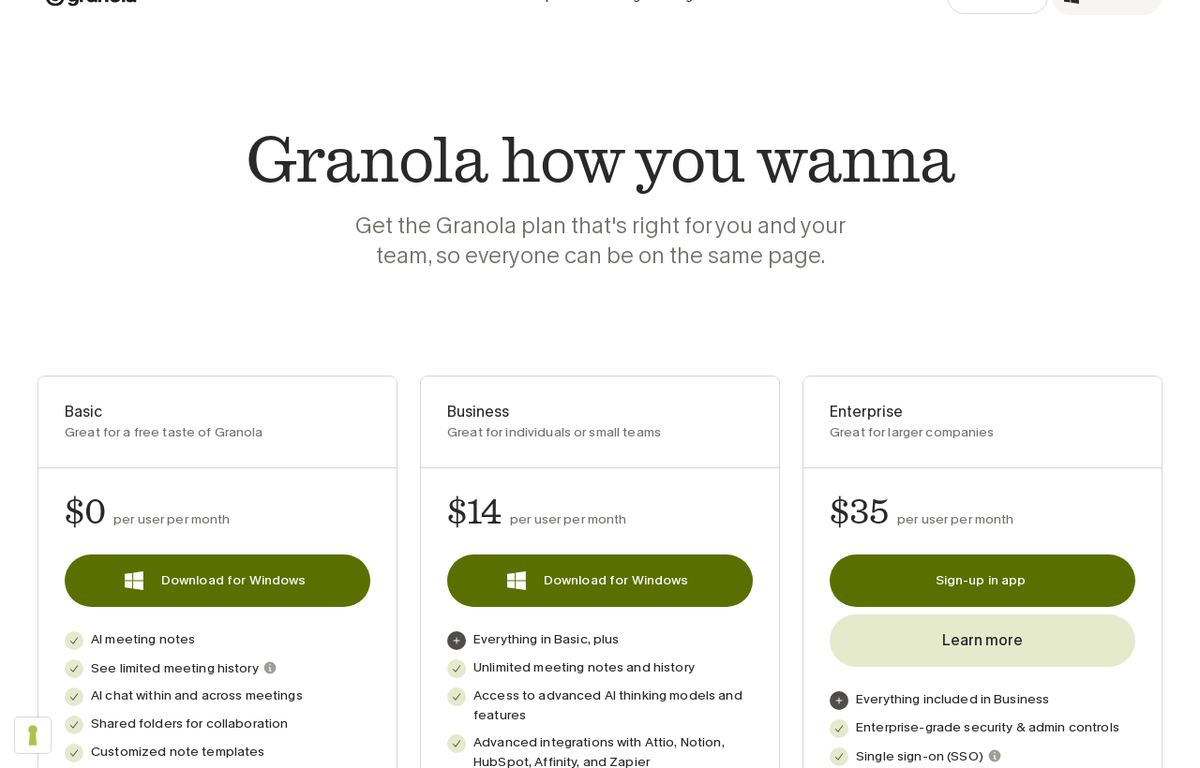
The free Basic plan includes AI notes and chat but keeps only 30 days of meeting history. Business is $14 per user per month with unlimited notes and history, and Enterprise is $35 per user. Granola lists no yearly discount.
Screenshot: Granola pricing page
Watch for: the 30 day history limit on the free plan. If you need to search last quarter's calls, you will need Business.
Krisp
Best for: people who take calls from noisy places.
Krisp started as noise cancellation and still leads with it: it removes background noise, echo and cross-talk in any meeting app. On top of that, it records meetings and writes transcripts, summaries and action items. It also offers accent conversion for clearer speech in real time.
There is no free plan in our data, only a 7-day free trial with no credit card. Core is $16 per user monthly or $8 yearly. Advanced is $30 monthly or $15 yearly.
Watch for: you pay after a week, so set a reminder if you are only trying it.
Other options worth knowing
Loom: not a live note taker, but its Business + AI plan ($24 per user) writes notes and recaps from recorded videos, which can replace some meetings entirely. The free Starter plan covers 25 videos.
Notion: if your team already lives in Notion, its templates make meeting notes pages quick to set up, and Notion AI on paid plans answers questions from your workspace with citations.
AssemblyAI: a speech-to-text API for developers who want to build their own meeting tool. Its free tier needs no credit card, and paid usage is billed per hour of audio.
Privacy questions to ask before you roll one out
Meeting notes hold some of the most sensitive things a company says out loud. Before you add a note taker to every call, check these points on the official pages:
Where recordings are stored and for how long. Fireflies lists custom data retention and private storage on Enterprise.
Whether your data trains AI models. Granola lists "training off by default" on its Enterprise plan, which tells you the default can differ on other plans.
Admin controls and sign-in. SSO and SCIM usually live on the top tier, as with Fireflies Enterprise.
Compliance needs. If you work in health care, look for HIPAA compliance in writing. Fireflies lists it on Enterprise.
How to choose in three questions
Chart: free plans at a glance, from official pricing pages
Is a visible bot acceptable in your meetings? If yes, compare Otter and Fireflies. If no, look at Granola, or Krisp if you also need noise cancellation.
Is it for you or for a team? Solo users get the best price from Otter Pro yearly. Teams should try Fireflies' free plan first, since everyone can join at no cost.
How long do you need to keep notes? If you look back months later, avoid plans with short history limits, like Granola's free 30 days.
Our take
AI note takers have reached the point where transcripts and summaries are standard on every tool. What separates them is how they join the call, how long they keep your notes, and how much you save by paying yearly. Start with a free plan, run it for two weeks of real meetings, and only then commit to a yearly plan. With savings of 44% to 51% on yearly billing for Otter, Fireflies and Krisp, the commitment is worth it once you know the tool fits.
Otter.ai is an AI meeting assistant that joins Zoom, Microsoft Teams and Google Meet to transcribe, summarize and answer questions about your calls. It has a free plan with 300 minutes and paid plans available.
Free plan·from $8.33No reviews yet
Fireflies.aiProductivityFree plan·from $10
Fireflies.ai is an AI meeting assistant that joins Zoom, Google Meet and Teams calls to record, transcribe and summarize them. It suits sales, recruiting and remote teams, with a free plan and paid plans available.
Free plan·from $10No reviews yet
Granola AIProductivityFree plan·from $14
Granola is an AI notepad for meetings that captures audio from your device, with no bot joining the call, and turns your rough notes into clean summaries. It suits busy professionals, with a free Basic plan and Business at $14 a month.
Free plan·from $14No reviews yet
KrispProductivityFree plan·from $8
Krisp is an AI meeting assistant that cancels background noise, echo and cross-talk, then records, transcribes and summarizes your calls. It works with any meeting app, with a 7-day free trial and paid plans available.
Free plan·from $8No reviews yet
ScreenpipeProductivityFree plan·from $20.83
Screenpipe captures your screen, audio and meetings on your own device and makes that history searchable for you and your AI tools. It runs on macOS, Windows and Linux, with a free plan and Basic at $21 a month.
Free plan·from $20.83No reviews yet
LoomProductivityFree plan·from $18
Loom is a screen and camera recorder for quick video messages, with instant share links, comments and transcripts in 50+ languages. It suits teams that explain work visually, with a free plan and paid plans available.
Free plan·from $18No reviews yet
NotionProductivityFree plan·from $10
Notion is an all-in-one workspace for notes, docs, wikis and project tracking, with built-in AI that answers with citations and agents that handle repetitive tasks. It has a free plan and Plus from $10 per seat.
Free plan·from $10No reviews yet
AssemblyAIAudio voiceFree plan·from $0.21/hr
AssemblyAI is a speech-to-text API that transcribes recorded and live audio for developers. It suits teams building voice agents, meeting tools and call analytics, and it starts free with no credit card.

 aiscopelist