It's 2:45 AM. You've been wiring up the same auth flow you've built four times before. The login form works. The password reset email doesn't. Somewhere in a Tailwind config you haven't touched since March, a single misplaced class is making your dashboard sidebar overlap the content like a bad collage.
The idea you had at dinner, the one that felt like a real product, is now buried under a pile of plumbing.
Most developers don't quit because the idea was bad. They quit during the plumbing. Most of any SaaS app is the same scaffolding: auth, a database schema, CRUD screens, a billing hook, a settings page. You have written it before. Nobody has ever been paid extra for typing it again.
The stack below exists to make that scaffolding someone else's problem, mostly a machine's. Here is how a solo developer can go from blank screen to a running full-stack app in about twenty minutes, what that twenty minutes does and doesn't buy you, and the places where the whole thing quietly falls apart.
The honest version of "20 minutes"
Let's set expectations, because most articles on this topic won't.
Twenty minutes gets you a deployed, working skeleton: real authentication, a real Postgres database with row-level security, a styled interface, and your core feature's happy path working end to end. It does not get you a hardened, scaled, edge-case-proof production system. Stripe webhooks that survive retries, rate limiting, observability, and an accessibility pass are the work of the following days.
But the following days now start from a running product instead of a blank repo. That shift is the whole story.
The three-layer stack
Think of it as three tools with three distinct jobs. The mistake most people make is asking one tool to do all three.
Layer 1: Lovable, the architect's sketch. You describe the product in plain language and get a working React app (Vite, Tailwind, shadcn/ui components) wired to a Supabase backend, with auth and database tables generated from your description. It also syncs to a GitHub repo, which matters enormously for what comes next. Lovable is the fastest path from "idea in my head" to "thing I can click."
Layer 2: Cursor, the workshop. Cursor is a VS Code fork with AI woven into the editor itself. Once Lovable hands you a repo, Cursor is where you do real engineering: refactoring across files, adding logic Lovable fumbles, and reading code you didn't write. Its agent mode can plan and execute multi-file changes, and its rules files let you teach it your conventions once instead of every prompt.
Layer 3: Claude, the senior pair. Whether it runs inside Cursor or in a separate chat window, a strong Claude model is the one you hand the hard problems: Stripe webhook idempotency, Postgres row-level security policies, a gnarly migration. Claude 3.7 Sonnet was the release that made this division of labor feel viable for many developers, mostly because it held a coherent plan across a big diff instead of losing the thread halfway. Newer Sonnet-class models are stronger still, and everything below works with whichever current model you have access to. Swap it in and keep the method.
The walkthrough: building a real app, minute by minute
For this breakdown, take a small but genuine SaaS idea: Nudge, a tool where freelancers paste in overdue invoices and it drafts polite-but-firm follow-up emails on a schedule. Boring, useful, and the kind of small tool people happily pay for.
Minutes 0 to 6: Lovable builds the skeleton
You open Lovable and write a prompt that is specific about data and flow, not about vibes. Vague prompts get you generic apps. Here is the shape that works:
Build a web app called Nudge for freelancers who chase late invoices.

Users sign up with email and password. After login they land on a dashboard
listing their invoices in a table: client name, amount, due date, status
(pending / overdue / paid), and days overdue.

They can add an invoice via a modal form. Clicking an invoice opens a detail
page with a "Follow-up history" timeline and a "Draft follow-up" button
(leave the button non-functional for now).

Use Supabase for auth and database. Each user may only see their own invoices.
Clean, calm design: off-white background, one deep green accent, generous
spacing. Mobile-responsive.
Two details matter here. "Each user may only see their own invoices" pushes Lovable toward row-level security instead of leaving every user's data readable by every other user, a classic and embarrassing failure of AI-generated apps. And "leave the button non-functional" keeps the first generation focused. Scope creep inside a single prompt is where these tools start producing tangled output.
Within a few minutes you have a clickable app. Connect the GitHub sync before you do anything else. That repo is your escape hatch and the bridge to the next layer.
Minutes 6 to 9: Cursor takes over
Clone the repo, open it in Cursor, and before you ask for a single feature, write a rules file. This is the step people skip and then spend a week complaining that the AI "keeps doing it wrong."
# Project rules: Nudge

- Stack: React + Vite + TypeScript, Tailwind, shadcn/ui, Supabase.
- Never use `any`. Define types from the Supabase generated types.
- All database access goes through hooks in /src/hooks. No Supabase calls inside components.
- Every new table requires RLS policies in the same migration file.
- Prefer small, composable components. No file over 200 lines.
- Before making changes across more than 3 files, outline your plan first.
Five minutes of writing this saves you from re-explaining your architecture in every conversation. It is the cheapest win in the entire workflow.
Minutes 9 to 16: The real feature, with Claude doing the hard part
Now the "Draft follow-up" button needs a brain. This is where you open Cursor's agent and give it a bounded, checkable task:
Implement the "Draft follow-up" feature.

1. Create a Supabase Edge Function `draft-followup` that takes an invoice ID,
   fetches the invoice (verifying the caller owns it), and calls an LLM API to
   draft an email. Tone escalates with days overdue: friendly under 7 days,
   firm at 7-21, formal after 21.
2. Store the draft in a new `followups` table with RLS (owner-only).
3. Wire the button on the invoice detail page. Show a loading state and render
   the draft in an editable textarea.
4. Outline your plan first. Do not touch auth code.
The "do not touch auth code" line is a fence. AI agents are enthusiastic and will happily "improve" things you didn't ask about. Fences keep the diff reviewable.
Read the diff. All of it. This is the part where the "10x" claim either holds or collapses. The developers getting real speed from this stack are the ones who review fast and with intent, not the ones who accept everything and pray.
Minutes 16 to 20: Deploy and break it on purpose
Push to GitHub, let the host build it, and then spend your last minutes trying to break your own app. Sign up two accounts. Try to load account A's invoice by pasting its URL while logged in as account B. If you see it, your RLS is wrong, and you just found the most important bug in the project before a stranger did.
Lovable vs Bolt.new: which scaffold should you pick?
Both turn a text prompt into a running app. The difference is philosophy.
Lovable leans toward a polished, opinionated output: a consistent design language, tight Supabase integration, and clean GitHub sync. It feels like handing a brief to a designer who also happens to code.
Bolt.new runs a full development environment in your browser and gives you more flexibility over framework and stack. It feels like a very fast, very eager pair programmer who will build whatever you point at. If you want to choose your own framework or you're prototyping something unusual, that freedom is real.
Our rule of thumb: pick Lovable when the product looks like a standard SaaS (auth, dashboards, forms, a database) and you want the best-looking first draft. Pick Bolt.new when you have strong opinions about the stack or you're building something that doesn't fit the CRUD mold. Either way, export to a repo and continue in Cursor. You can compare both, along with v0 and Replit, in the no-code and low-code category.
What's brilliant, and what will bite you
The genuinely good:
The scaffolding problem is largely solved. Auth, schemas, and styled CRUD screens stop being a day of work.
Context switching drops. The same person can act as designer, backend dev, and reviewer without three separate toolchains.
Rules files make the AI's behavior repeatable, which turns a party trick into a workflow.
The honest limitations:
Security is yours. These tools will generate plausible-looking code with subtle holes: missing RLS policies, over-permissive API routes, secrets in the wrong place. Review anything touching auth, payments, or user data like it was written by a smart intern on their first day.
Prompt drift on big projects. Past a certain size, the AI loses the shape of your codebase. Small, bounded tasks beat sprawling ones every time.
Debugging code you didn't write is a real skill. When the generated app breaks in a way the AI can't fix, you need enough fundamentals to read the stack trace yourself. This stack amplifies engineers. It doesn't replace the need to be one.
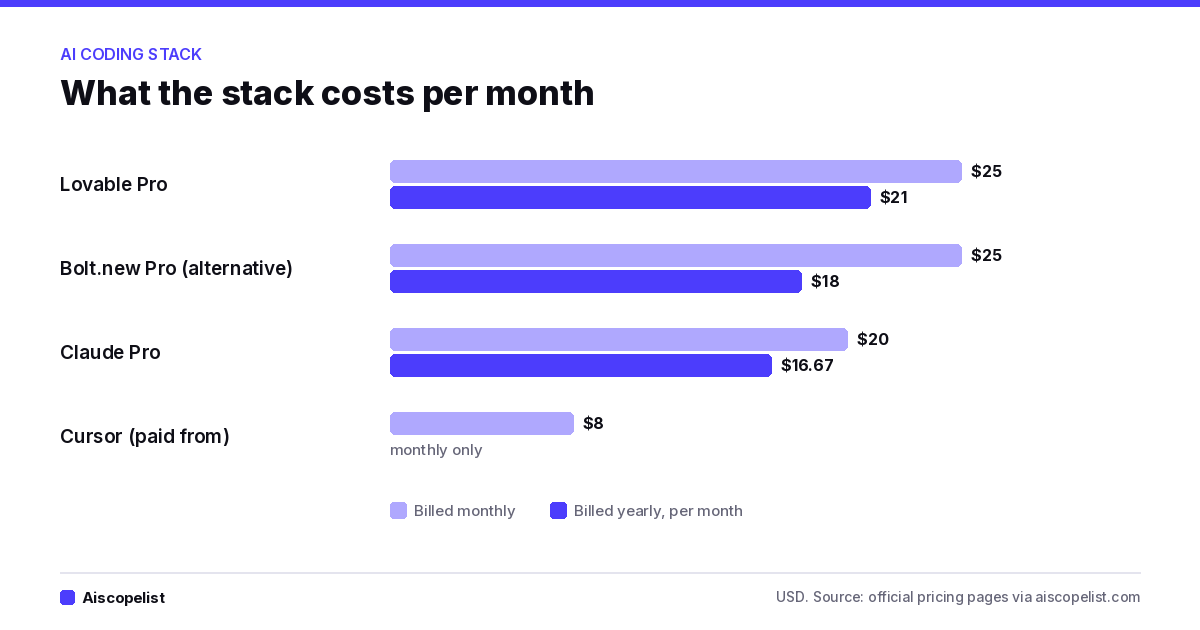
Cost creeps. Three subscriptions plus API usage adds up. According to the official pricing pages, Lovable Pro is $25 a month (or $21 a month yearly), Cursor's paid plans start at $8, and Claude Pro is $20, so this stack runs about $50 a month before API usage. Bolt.new Pro is $25 monthly or $18 a month yearly if you swap it in. Budget for it like a tool, not a toy, and see what AI tools cost per month for the wider picture.
Chart: what the stack costs per month, from official pricing pages
Steal this: the review prompt
After every significant AI-generated change, run this before you commit. It catches a surprising number of problems before they ship:
Act as a skeptical senior engineer reviewing this diff. Do not summarize it.
List: (1) any security issue, especially auth, RLS, or exposed secrets;
(2) any place user input reaches the database or an external API without
validation; (3) any behavior that works on the happy path but fails on
empty, null, or duplicate data; (4) anything that contradicts our rules file.
Be blunt. If it's fine, say so in one line.
Save it as a snippet so it is one paste away, and browse our prompt library for more ready-made prompts.
Go build the thing
Somewhere right now there's a developer with a half-finished side project, a stalled repo, and an idea that still gives them a small jolt when they think about it. The plumbing is what stopped them. It doesn't have to anymore.
Tools like these don't make the craft less valuable. They move it. The hours you used to burn on boilerplate can go to the parts only you can do: knowing which problem is worth solving, noticing when a feature is wrong, caring about the person on the other side of the screen.
Pick a small, real problem this weekend. Write the prompt. Write the rules file. Read every diff. Ship something ugly and working by Sunday night.
Then browse the AI coding tools on Aiscopelist to find the next one worth adding to your stack.
Frequently Asked Questions
Key questions and answers regarding AI Coding Workflow: Lovable, Cursor, Claude.
Lovable is an AI app builder that turns a chat prompt into a working web app or website, with hosting, a built-in cloud backend and team tools. It has a free plan with daily credits and paid plans available.
Free plan·from $21No reviews yet
CursorCodingFree plan·from $8
Cursor is an AI code editor and coding agent for building software, with a desktop app, CLI, cloud agents and AI code review. It suits developers and teams, with a free plan and paid plans available.
Free plan·from $8No reviews yet
ClaudeChatbotsFree plan·from $17
Claude is Anthropic's AI assistant for writing, research, data work and coding, with a context window of up to 1 million tokens. It suits professionals and developers, and it has a free plan with paid plans available.
Free plan·from $17No reviews yet
Bolt.newCodingFree plan·from $18
Bolt.new is an AI app builder that turns a text prompt into a working website or web app, with hosting and a database included. It suits founders and small teams who want to ship a prototype without hiring a developer.
Free plan·from $18No reviews yet
v0CodingFree plan·from $30
v0 by Vercel is an AI app builder that turns prompts into working web apps, sites and UI with real code you can edit, sync to GitHub and deploy. It has a free plan with $5 in credits, and Plus is $30 per user a month.
Free plan·from $30No reviews yet
ReplitCodingFree plan·from $18
Replit is a browser-based platform where Replit Agent turns your ideas into working apps and websites, then hosts them. It has a free Starter plan, with Core and Pro paid plans available.

 aiscopelist