The best free AI video generator for most people right now is PixVerse, because it is the only one in our list that refills credits every day on top of a starting balance. Adobe Firefly Ai and Kling AI also refresh daily. Runway gives you a one-time pile of credits to try it, and avatar tools like HeyGen and Synthesia let you make a few watermarked videos each month.
That is the quick version. The longer version matters, because "free" means very different things across these tools. Some give you a daily allowance you can use forever. Some give you a one-time starter pack. Some advertise a free plan that, when you read the pricing page, has no free generations at all.
Everything below comes from each tool's official pricing page, as recorded on its listing here. We do not run our own generation trials, so we describe plans and limits, not output quality.
Daily refills are the best deal for learning, because you can practice a little every day without paying. One-time credits are better thought of as a free trial.
The best free text-to-video generators
1. PixVerse: the most generous daily allowance
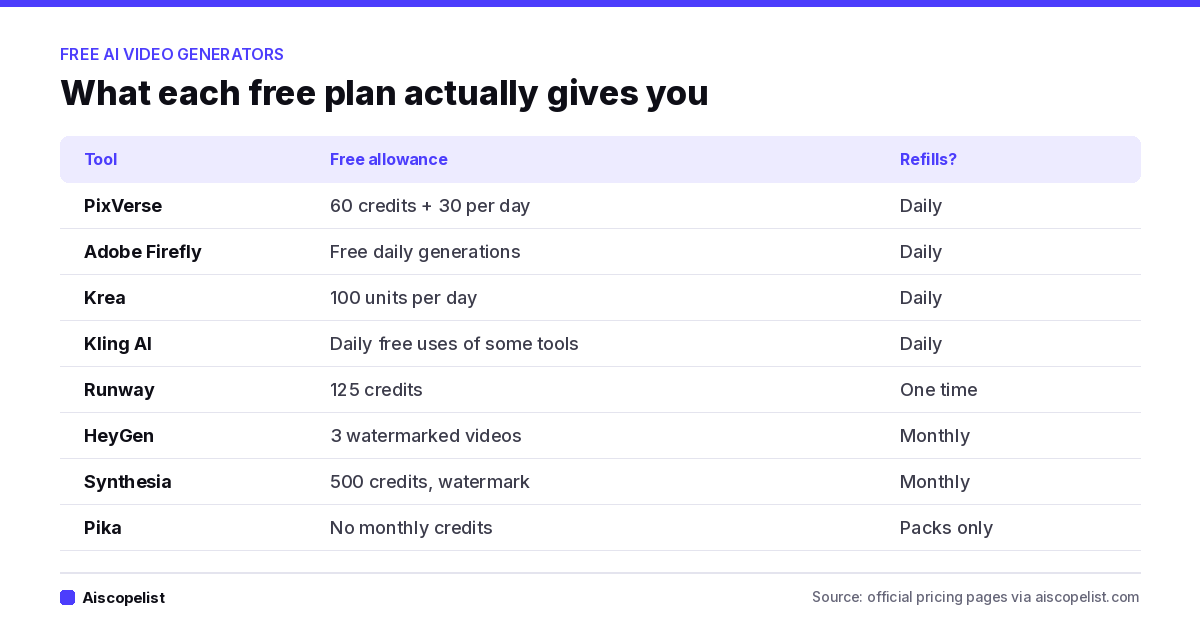
PixVerse's Basic plan starts you with 60 credits and adds 30 more every day, according to its pricing page. That combination is rare. Most tools give you one or the other. If you want to learn how prompts turn into motion, this is the cheapest place to make a lot of mistakes.
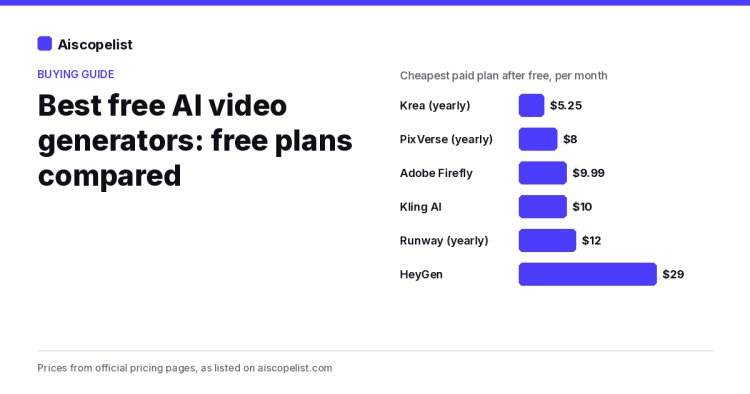
When you outgrow it, Standard costs $10 a month for 1,200 credits per 30 days. Paying yearly drops it to $8 a month ($96 a year), a 20% saving that matches the market median in our AI Tool Price Index.
2. Adobe Firefly: daily generations from a big brand
Firefly's free plan gives you free daily generations, and the limits refresh every day. The appeal here is the rest of the Adobe ecosystem: if you already use Photoshop or Premiere, Firefly fits into the same account. The first paid tier, Firefly Standard, is $9.99 a month for 2,000 generative credits. Paid plans are monthly only in our data.
3. Kling AI: try specific tools for free
Kling's free tier is narrower. The pricing page describes it as limited daily free uses of some tools, not all of them. It is a good way to see if Kling's style suits you before you pay $10 a month for Standard, which includes 660 credits. Kling has no yearly discount in our data, and its tiers climb fast: Pro is $37, and Premier is $207.
4. Krea: one account for images and video
Krea gives free users 100 units a day without asking for a credit card. It covers image and video generation in one place, which is handy if you make still frames first and animate them later. Krea also has one of the largest yearly discounts we track: Basic is $9 monthly or $63 a year, which works out to $5.25 a month.
5. Runway: a one-time starter pack
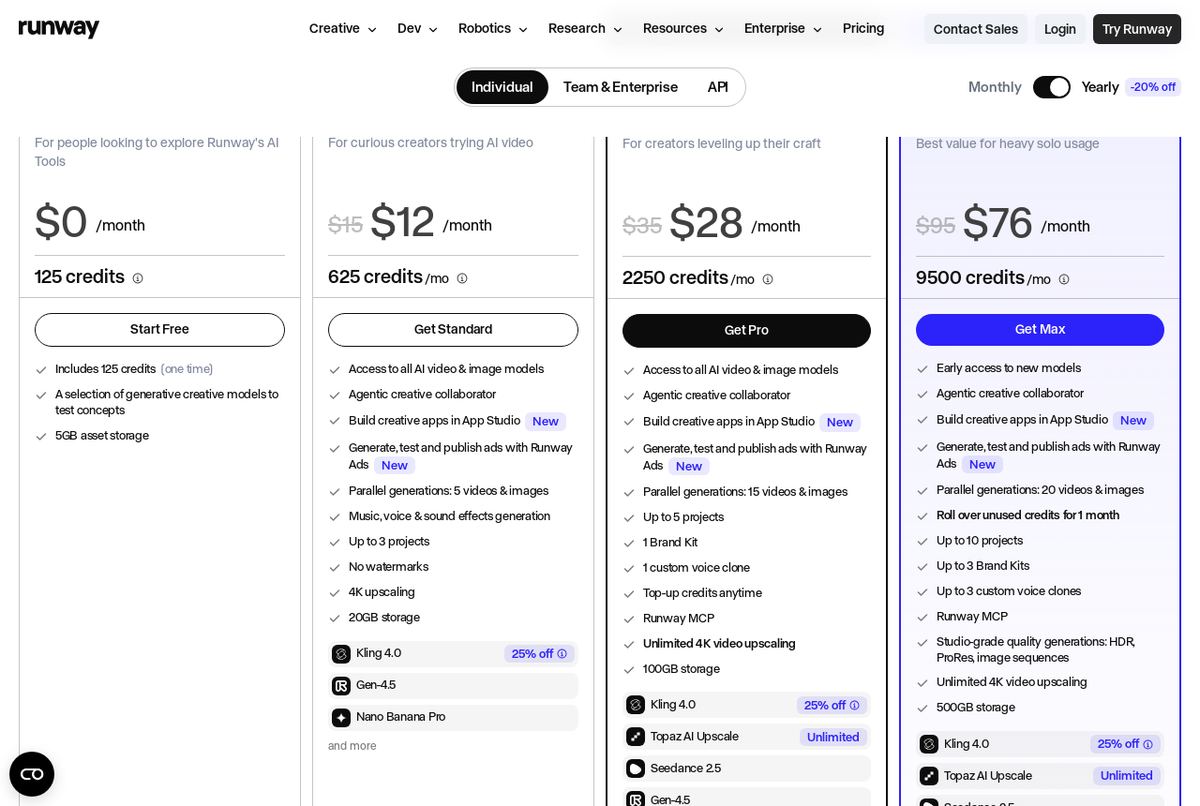
Runway's free plan includes 125 credits, and they are one-time, not monthly. Use them to learn the interface, then decide. Standard costs $15 a month or $144 a year ($12 a month) and adds 625 credits a month. You can read the full credit breakdown on Runway's pricing page.
Screenshot: Runway pricing page
Which free tool fits your project
Short social clips from a prompt: start with PixVerse for the daily credits, and add Kling or Firefly when you want a second style to compare.
Animating your own images: Krea keeps image and video generation in one account, so you can make a frame and animate it without moving files around.
A talking presenter for training or sales: try HeyGen and Synthesia side by side. HeyGen limits you by video count, Synthesia by credits.
Cutting real footage: CapCut's free plan is the simplest place to start, and Descript suits talking-head videos and podcasts because you edit by text.
A one-off cinematic shot: use Runway's 125 starter credits on one carefully planned clip instead of spreading them thin.
Free AI avatar video generators
Avatar tools work differently. Instead of generating a scene from a prompt, they turn a script into a presenter talking on screen. These are the tools people use for training videos, product explainers and translated clips.
HeyGen
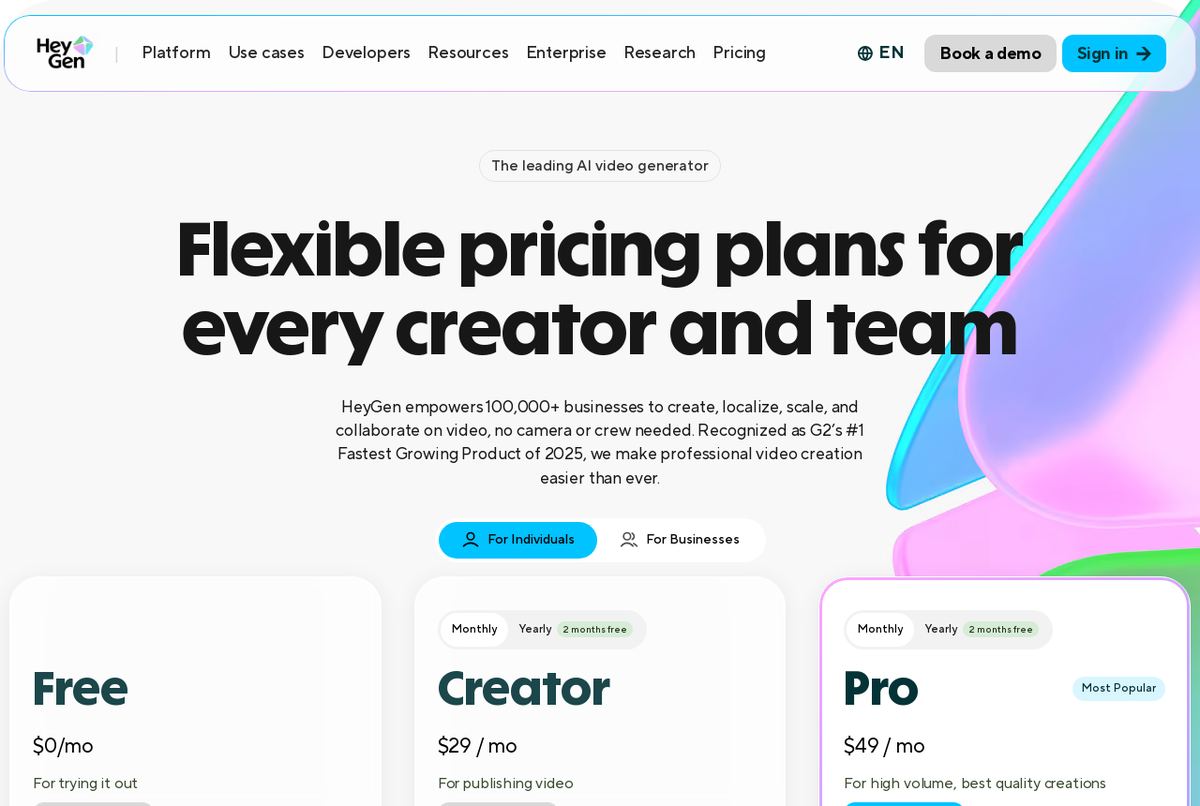
HeyGen's free plan allows 3 watermarked videos per month. That is enough to try a script and show it to a client, but not enough to publish regularly. Creator, at $29 a month, includes 600 credits that roll over for one month. There is no yearly option in our data.
Screenshot: HeyGen pricing page
Synthesia
Synthesia's Basic plan gives you 500 credits a month, with a watermark. Starter is $19 monthly or $168 a year ($14 a month), which is a 26% saving for paying upfront. The pricing page says Starter covers up to about 150 minutes of video a year.
Free AI video editors worth knowing
Not every "AI video" search is about generating clips from nothing. Often you already have footage and want AI help cutting, captioning or cleaning it up.
CapCut: free plan with basic editing tools and free templates. Pro costs $19.99 a month or $179.99 a year, with 1,200 AI credits a month.
VEED: you can start for free with limited features. Paid plans are sold yearly only, from $120 a year for Creator.
Descript: the free plan includes 60 media minutes a month. Hobbyist costs $24 monthly or $16 a month yearly.
"Free" plans that are not really free
Two tools often show up in lists of free AI video generators, so it is worth being clear.
Pika AI lists a free plan, but the pricing page says it comes with no monthly credits; you buy credit packs. In practice, you will pay before you make much. Starter is $10 a month, or $8 a month yearly, for 900 credits.
Luma AI has no free plan in our data. Its plans start at $30 a month for 10,000 credits. It may be the right tool for some projects, but it does not belong in a "free" list.
How to get the most out of a free plan
Chart: what each free plan gives you, from official pricing pages
Draft cheap, render once. Work out your prompt with short, low-cost generations. Spend credits on the long, high-quality version only when the idea is right.
Stack daily refills. PixVerse, Firefly, Krea and Kling all refresh daily. Using two or three of them gives you far more free output than any one plan.
Read the watermark rules. HeyGen and Synthesia say their free videos carry a watermark. For other tools, check the pricing page before you plan a client delivery.
Check commercial use. Free plans sometimes limit how you can use the output. If a video is for a paying client, confirm the license on the official site.
Upgrade for one month first. Video tools change fast. Pay monthly while you learn, and switch to yearly only after the tool has earned it.
What paid AI video costs when you outgrow free
Across the 9 video tools in our price index that list a monthly price, the median cheapest paid plan is $15 a month. That puts video in the middle of the market: more than chatbots ($8 median), less than coding tools ($20). Most of the generators in this list start at or below that median. HeyGen ($29) and Luma ($30) cost about twice as much, while Synthesia ($19) and CapCut ($19.99) sit a few dollars above it.
PixVerse is an AI video platform that turns text and images into short videos with its own V6 model and others like Seedance and MiniMax. It gives free daily credits, with paid plans available.
Adobe Firefly turns text prompts into images, 5-second videos, speech and music. It fits designers and marketers who want AI output they can use in client work, plus credits that also work in Photoshop and Premiere.
Free plan·from $9.99No reviews yet
Kling AIVideoFree plan·from $10
Kling AI is a video and image generator from Kuaishou that makes clips with synced audio, smooth motion and native 4K detail. It suits creators and marketers, with free daily uses and paid plans offering additional features.
Free plan·from $10No reviews yet
Krea AIImage GenerationFree plan·from $5.25
Krea AI is a creative suite that brings image, video and upscaling models into one workspace, plus an agent that plans and builds whole sets of visuals. It has a free plan with daily units and paid plans available.
Free plan·from $5.25No reviews yet
Runway Gen-3 AlphaVideoFree plan·from $12
Runway is an AI creative platform for generating video, images, music and voice, led by its Gen-4.5 video model. It includes 125 free credits to start, with paid plans from $12 a month billed yearly.
Free plan·from $12No reviews yet
HeyGenVideoFree plan·from $29
HeyGen is an AI video generator that turns scripts into videos presented by AI avatars, including a custom avatar of you. It suits marketers, educators and businesses, with a free plan and paid plans available.
Free plan·from $29No reviews yet
SynthesiaVideoFree plan·from $14
Synthesia is an AI video platform that turns text into presenter-style videos with AI avatars, voices and dubbing. Teams use it for training and comms, with a free plan and Starter from $14 a month billed yearly.
Free plan·from $14No reviews yet
CapCutVideoFree plan·from $12.49
CapCut is a video editor for desktop, mobile and the web, with auto captions, text to speech, templates and AI video generation. It suits social media creators and small teams, and the basic editor is free to use.
Free plan·from $12.49No reviews yet
Pika AIVideoFree plan·from $8
Pika is an AI video platform with its own fast Pika models plus models like Seedance, and tools to extend clips, grade color and score video with sound. It has a free option with credit packs and paid plans available.
Free plan·from $8No reviews yet
Luma AIVideofrom $30
Luma AI is a creative platform for generating video and images with its Ray models and other leading models, plus Luma Agents for bigger projects. It suits creative teams and marketers, with paid plans available.

 aiscopelist